Is Your Humidifier Working? A Quick Troubleshooter
Learn how to tell if your humidifier is working with simple checks, humidity testing, and maintenance tips from HumidifierBasics. Quick fixes and safety tips for homeowners.


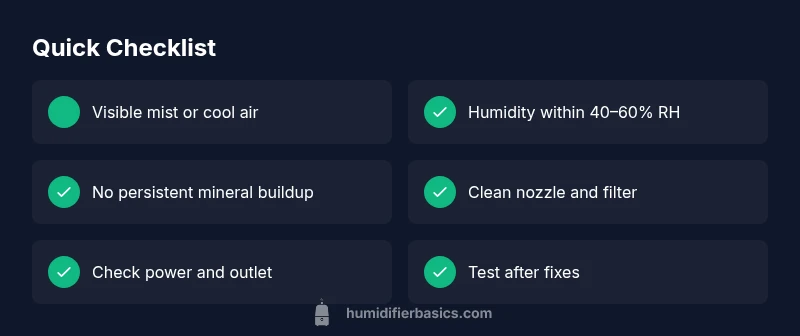
To tell if your humidifier is working, look for visible mist or cool air, and check humidity with a hygrometer around 40–60%. You should also notice softer air and fewer dry symptoms. If there’s no mist, inspect the water level, fill line, filter, and power. If problems persist, service may be required.
Understanding what 'working' means for a humidifier
In practical terms, a humidifier is considered to be working when it can produce visible moisture, maintain air humidity within a healthy range, and operate safely without leaks or unusual noises. For homeowners, this isn’t about perfection but about consistent output relative to the room size and water quality used. According to HumidifierBasics, the fastest way to confirm functional performance is to combine three checks: a quick visual cue, a simple air-dry test, and a humidity reading. If any of these indicators are missing or inconsistent, start a focused check on the most likely culprits: water supply, power, and cleanliness. This foundational understanding helps you diagnose problems quickly and avoid unnecessary replacement.
Visual cues: mist, airflow, and noise
Visible mist or cool air from the outlet is a primary signal the device is producing moisture. Many cool-mist units produce a gentle fog that should be seen within seconds of turning on the unit. You may also notice the surrounding air feel less dry, and your skin or throat symptoms diminish. Listen for the fan or pump operation; unfamiliar rattles or grinding can indicate a mechanical issue. If you don’t observe these cues after a minute of operation, move to the next checks rather than assuming the unit is broken. Regular cleaning can restore visible output that has faded from mineral buildup.
Humidity testing with a hygrometer and targets
A hygrometer is the most reliable way to verify that your humidifier is affecting room conditions. Place the sensor at breathing height in the main living area, away from direct heat or drafts. Aim for a steady indoor humidity in the range of roughly 40–60%, with adjustments based on season and comfort. In very dry winter homes, you may target toward the higher end; in damp climates, stay toward the lower end to avoid condensation. Record readings over a couple of hours to account for fluctuating airflow and door openings. If readings stay flat despite output, you’ve narrowed the problem to the device’s ability to add moisture.
Quick checks you can perform safely
Before tools, walk through these simple checks:
- Confirm the unit is plugged in and switched on, and that the outlet is powered.
- Check the water reservoir for adequate water and confirm the fill line is visible.
- Inspect the mist outlet/nozzle for obstructions and clean as needed.
- Inspect any filters for buildup; rinse or replace per the manufacturer guidance. If you perform these checks and still see no output, proceed to the diagnostic flow for deeper causes.
Note: Always unplug the unit before handling components to avoid electric shock. Use mild cleaning solutions or distilled water when in doubt to protect internals.
Diagnostic path: symptom to diagnosis
This flow helps map common symptoms to probable causes and practical fixes:
- Symptom: No visible mist after turning on. Diagnosis: water supply or power issue. Fix: refill water, check fill line, ensure outlet is live. If unresolved, inspect the power switch and cord for damage.
- Symptom: Humidity doesn’t rise above baseline. Diagnosis: insufficient output or leakage. Fix: check reservoir seal, inspect hose/nozzle, and clean components.
- Symptom: Noisy operation or odor. Diagnosis: dirty filter or mold buildup. Fix: clean or replace filters, sanitize the reservoir, and run a test spike in humidity after cleaning. Always verify after each fix by rechecking mist, airflow, and hygrometer readings. If none apply, consult a repair professional.
Step-by-step fixes for the most common issues
- Refill and reseat: Refill the tank to the fill line, reseat the tank on the base, and run a short cycle to confirm output.
- Clean components: Soak the nozzle and reservoir cap in vinegar solution to break mineral buildup, rinse thoroughly, and dry before reassembly.
- Check power and switch: Test the power switch and plugin with a known-good outlet.
- Replace filters: If your model uses a replaceable filter, install a new unit following the instruction manual.
- Inspect seals and leaks: Look for cracks around gaskets; tighten or replace as needed.
- Test and observe: Run for 15–30 minutes in a small room, monitor humidity, and note any persistent issues. Tip: Always unplug before maintenance and wear gloves when handling cleaning solutions.
Maintenance habits to keep your humidifier reliable
Create a simple weekly routine to prevent performance dips:
- Empty and rinse reservoirs daily to prevent mold.
- Clean components with a mild solution monthly.
- Replace filters as recommended by the manufacturer.
- Use distilled water when possible to reduce mineral buildup.
- Store units dry between seasons and inspect seals before reuse. Following these steps reduces the chance of blockages and ensures you get consistent humidity when you need it.
When to seek professional help and safety reminders
If you have tried the diagnostic flow and basic fixes without improvement, it’s time to contact a service professional. Electrical issues, persistent leaks, or a cracked tank can pose safety risks and require specialized parts. Do not attempt high-voltage repairs yourself. Safety first: unplug the unit, avoid water around electrical outlets, and consult the user manual for proper procedures. Keeping a maintenance log helps you track when parts were replaced and when service is needed.
Steps
Estimated time: 20-30 minutes
- 1
Power check and safety prep
Ensure the unit is unplugged before inspection. Verify the outlet is live by testing another device. Plug the humidifier back in only after you confirm basic power availability.
Tip: Always start with unplugging to prevent shocks. - 2
Inspect water reservoir and fill line
Remove the tank and check for leaks or cracks. Refill to the fill line and reseat the tank securely on the base. Ensure the seal is clean and properly positioned.
Tip: Use distilled water to prevent mineral buildup. - 3
Check nozzle and air path
Look for mineral deposits or blockages in the mist outlet. Clean with a soft brush or cloth; avoid aggressive scrubbing that could damage parts.
Tip: A vinegar soak can help loosen hard mineral buildup. - 4
Clean filters and components
Remove and rinse filters if applicable. Replace filters per the manufacturer schedule. Sanitize the reservoir with a mild solution if odor is present.
Tip: Rinse thoroughly to avoid residual cleaning agents. - 5
Test run and observe output
Reassemble, power on, and run in a small room for 15–30 minutes. Use a hygrometer to gauge humidity changes and confirm mist visibility.
Tip: Document readings to track performance over time. - 6
Record results and plan maintenance
Note what worked and what didn’t. Plan a regular cleaning and filter replacement schedule to prevent recurrence of issues.
Tip: Keep a simple maintenance log for quick reference.
Diagnosis: Humidifier fails to produce visible mist or increase room humidity
Possible Causes
- highLow water level or empty reservoir
- highPower issue (outlet, plug, switch) or unit not turned on
- mediumClogged nozzle or dirty filter/mineral buildup
- mediumFaulty humidistat, control board, or sensor
- lowSeal leaks or improper assembly causing inefficient output
Fixes
- easyRefill reservoir to the proper fill line and reseat the tank
- easyCheck power supply, outlet, switch, and cord; plug into a known-good outlet
- easyClean nozzle and filter; use vinegar solution or manufacturer cleaner; rinse thoroughly
- mediumReplace filter or humidifier components as recommended
- mediumInspect seals/assembly for leaks; reseal or replace parts
- hardIf issues persist, contact a professional technician
FAQ
What humidity level should I aim for when using a humidifier?
A healthy indoor humidity range is typically about 40–60% RH. Adjust within this window based on comfort, season, and ventilation to prevent condensation or mold.
Aim for 40 to 60 percent humidity; adjust for season and comfort.
Why is there no mist even though the unit is on?
Check the water reservoir, fill line, and ensure the unit is powered. Inspect the nozzle for blockages and clean if needed. If still no output, test the outlet and power switch.
No mist usually means water or power issues; check the reservoir and nozzle.
Can hard water affect humidifier performance?
Yes. Hard water can cause mineral buildup that blocks output. Use distilled water when possible and clean mineral deposits regularly.
Hard water causes buildup; use distilled water when you can.
How often should I clean a humidifier?
Clean weekly if you use the unit daily; perform a deeper clean monthly and after periods of disuse. Always follow the manufacturer’s cleaning instructions.
Clean weekly with a deeper clean monthly.
When should I replace the humidifier filter?
Replace filters according to the manufacturer’s schedule or sooner if the water quality is poor or the output declines noticeably.
Replace filters as the manual recommends.
Is it safe to use essential oils in humidifiers?
Not all humidifiers support essential oils. Oils can clog the mechanism and void warranties. Always consult the manual before using oils.
Check the manual; not all units support oils.
Watch Video
The Essentials
- Check mist output and hygrometer readings to confirm operation
- Aim for 40–60% humidity with room size in mind
- Clean and replace filters regularly to maintain performance
- Refill water and inspect seals before deeper fixes
- Seek professional help if safety or electrical concerns arise