Why Is My Humidifier Light Red? A Practical Troubleshooting Guide
Learn why a red humidifier light signals an issue and follow a clear, step-by-step fix: check water levels, clean components, replace filters, and know when to seek professional help for safe, reliable humidity.


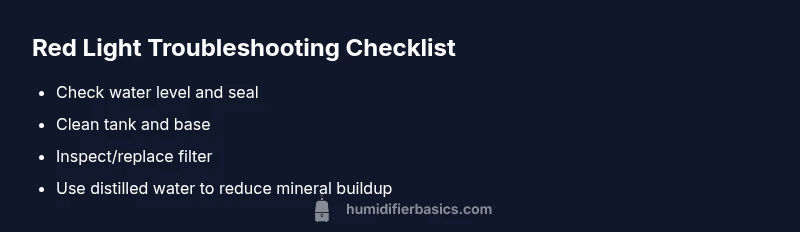
Why is my humidifier light red? In most models, a red indicator signals a fault, low water, or a needed cleaning. Quick fix: unplug the unit, refill to the recommended level, and perform a thorough cleaning of the tank, ultrasonic disk, and water tray. If the red light persists after these basics, consult your manual or contact support.
Understanding what a red light means
When you notice a red light on your humidifier, you may wonder why is my humidifier light red. In many models, a red indicator signals a fault or a maintenance need, not a decorative feature. According to HumidifierBasics, red lights are safety alerts meant to protect you and your device; the exact meaning can vary by brand and color code, so always check the manual for your model. Common causes include a low water level, a clogged sensor, mineral buildup, or a blocked airflow path. A red light often appears after a period of inactivity or if the water tank is empty. If you leave water in the tank, some models will still show a caution light if the purity of water is compromised or if mineral buildup interferes with sensors. The HumidifierBasics team stresses that most red indicators are resolved by simple maintenance rather than expensive repairs. Start with basic checks first; you’ll often fix it without tools or professional help.
Check the basics first
If you’re troubleshooting a red light, start with the simplest checks. Ensure the humidifier is unplugged before handling any parts. Refill the water tank to the recommended level and confirm the water reservoir is properly seated. Check the power cord and outlet for any damage or looseness. If your model has a digital display or indicator lights, note any error codes shown; write them down to consult the manual. After addressing these basics, power the unit back on and observe whether the red light returns. If yes, proceed to cleaning and maintenance steps. This order follows the diagnostic principle: fix the easiest issues first, then move to more involved tasks.
Cleaning and mineral buildup
A common reason for a red light is mineral buildup or contamination in the tank or base. Why is my humidifier light red? Cleaning is often the fastest fix. Disassemble the tank and base according to the user manual and wash all washable parts with mild soap and warm water. Use a soft brush to remove mineral deposits from crevices and the wick or evaporator plate if your model uses one. Rinse thoroughly and let all parts dry completely before reassembly. If your device uses an ultrasonic disk, gently wipe it with a damp cloth to remove residue. For hard water, consider a brief sanitizing rinse with a mixture of water and a small amount of distilled white vinegar, then rinse again. Avoid harsh chemicals. HumidifierBasics notes that repeated mineral buildup can trigger sensors, causing false red warnings; regular cleaning reduces this risk.
Filter and water quality considerations
If the humidifier uses a replaceable filter, inspect it for wear or clogging; a clogged filter can trigger a red light or error message. Replace filters according to the manufacturer’s schedule. Water quality matters: tap water often contains minerals that leave scale on internal parts; using distilled or demineralized water reduces mineral deposits and may prevent red indicator false alarms. Some models alert you when water is too dirty or contaminated; in those cases, drain and refill with clean water. Record how often you clean or replace filters to maintain consistent performance. Based on HumidifierBasics analysis, consistent maintenance reduces the odds of recurring red warnings.
Safety considerations and when to stop using
A red light can indicate an overheating sensor or electrical fault; if you notice burning smells, heat near the base, unusual noises, or smoke, turn off and unplug immediately. Do not operate the humidifier if the red light reappears after cleaning and refilling. Keep the unit away from kids and pets, and place it on a stable, heat-resistant surface. Do not attempt repairs beyond cleaning and basic maintenance; opening the housing may void the warranty and create electrical hazards. If you cannot clear the red warning after basic steps, seek professional service.
When to contact support and what to expect
If basic troubleshooting doesn’t resolve the red light, consult the manual for fault codes and warranty coverage. Contact the manufacturer’s customer support or a qualified appliance technician. Have your model number, serial, and any error codes ready. Ask about sensor replacement, power-board inspection, or replacement parts. Expect a diagnostic call or service visit; keep receipts and warranty information handy.
Preventive maintenance to avoid future red lights
Schedule regular cleaning after every use; empty and dry the tank if you won’t use the humidifier for an extended period. Use distilled water to minimize mineral buildup. Replace filters on schedule, and keep airflow paths clear of dust. Clean the base and nozzle monthly, and check for cracks or leaks. To avoid asking why is my humidifier light red again, implement a simple maintenance routine. Store the unit away from heat sources and direct sunlight. A proactive maintenance routine reduces the likelihood of red warning lights and extends the life of your humidifier.
Steps
Estimated time: 25-40 minutes
- 1
Power off and unplug the unit
Safety first: unplug the humidifier and disconnect from the outlet before touching any components. This prevents electric shock during inspection. Inspect for visible signs of damage on the power cord.
Tip: Always unplug before any disassembly to avoid hazards. - 2
Check water level and reseat the tank
Open the housing and verify the water level is within the recommended range. Re-seat the tank to ensure a proper seal and no air bypasses the pump.
Tip: A loose seal can trigger sensors and false red warnings. - 3
Clean the tank and base
Disassemble and wash all removable parts with mild soap and warm water. Use a soft brush to remove mineral deposits from crevices. Rinse, dry, and reassemble.
Tip: Mineral buildup is a common cause of false alerts; regular cleaning helps. - 4
Inspect/replace the filter
If your model uses a filter, check for wear or clogging. Replace according to the schedule or sooner if the light indicates a fault tied to filtration.
Tip: Always use the correct filter type for your model. - 5
Check water quality and mineral buildup
If mineral scale is visible, consider using distilled water and wiping mineral residues from internal parts. This reduces future false red indicators.
Tip: Distilled water minimizes mineral deposits that trigger lights. - 6
Test run and observe the light
Reassemble, plug in, and run the humidifier for a short cycle. Note whether the red light stays, returns, or clears after the steps above.
Tip: If the red light persists, proceed to escalation steps. - 7
Escalate if red light persists
If the light remains red after basic maintenance, consult the manual for fault codes or contact support for diagnostic service.
Tip: Document error codes and timing to aid support.
Diagnosis: Humidifier shows a red light
Possible Causes
- highLow water level
- highClogged sensor or nozzle
- mediumMineral buildup in tank/base
- mediumDirty water or contaminated tank
- lowElectronic fault / sensor failure
Fixes
- easyRefill water to the recommended level and reseat the tank
- easyClean the tank, base, and any sensors/nozzle; rinse thoroughly
- easyReplace the filter if applicable and use distilled water
- easyReset the humidifier or unplug for a minute, then power on
- easyIf red light persists, consult the manual or contact support
FAQ
What does a red light mean on a humidifier?
A red light usually indicates a fault or maintenance need. It’s a safety alert, so start with basic checks: water level, cleaning, and filter status. If unresolved, consult the manual or support.
A red light usually means a fault or maintenance is needed. Start with water level, cleaning, and filter checks, then consult the manual if it stays on.
Is it dangerous to run a humidifier with a red light?
Not always dangerous, but you should stop and troubleshoot. Running it when the light remains could worsen the issue or indicate a sensor fault.
Not always dangerous, but it’s best to troubleshoot and stop using it until it’s resolved.
How do I reset the humidifier after a red light?
Unplug the unit for about a minute, then plug back in and power on. If the light returns, follow the manufacturer’s reset procedure in the manual.
Unplug for a minute, then plug back in and power on. If it returns, follow the manual’s reset steps.
Do red lights indicate mold or contamination?
A red light can indicate contamination in some models. Clean the tank and base, and sanitize according to the manual. If symptoms persist, replace parts or seek professional help.
A red light can indicate contamination in some models; clean and sanitize, then seek help if needed.
How often should I clean to avoid red lights?
Clean after every use or at least weekly, especially if you run the unit daily or use hard water. Regular cleaning reduces mineral buildup and false alerts.
Clean after use or weekly, especially with daily use or hard water.
When should I replace the humidifier due to a persistent red light?
If the red light persists after thorough cleaning and filter replacement, consider replacement options or professional diagnosis under warranty.
If it stays red after cleaning and maintenance, consider replacement and check warranty.
Watch Video
The Essentials
- Unplug and refill first to rule out low-water alerts
- Regular cleaning prevents false red warnings
- Use distilled water to reduce mineral buildup
- Replace filters on schedule to keep indicators accurate
- If red light persists after basics, seek professional help