When a Humidifier is Needed: A Practical Guide
Learn practical indicators for when a humidifier is needed, how to monitor humidity, choose the right type, and maintain your unit for healthier indoor air.


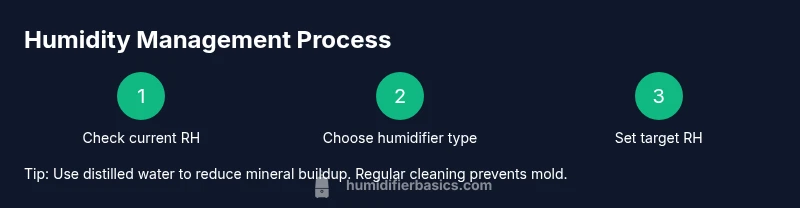
A humidifier is needed when indoor air becomes uncomfortably dry, typically when relative humidity stays below 30-40% for more than a few days. Use a hygrometer to monitor levels, identify rooms that need help, and select the right humidifier type and size for your space. This guide shows practical checks and setup steps.
When a Humidifier is Needed
Healthy indoor air humidity typically sits between 30% and 50%. A humidifier is needed when the air becomes uncomfortably dry or when symptoms appear that dry air can aggravate, such as irritated nasal passages, dry skin, sore throat, coughing, or increased static. According to HumidifierBasics, monitoring indoor humidity helps prevent health and comfort issues, especially in winter or in homes with poor insulation. Use a reliable hygrometer to confirm readings in the rooms you use most, and start with a unit sized for your specific space. If you notice wooden furniture cracking, increased dust, or peeling wallpaper, those can also signal insufficient moisture in your environment. Once you establish your ideal range, you can choose the right humidifier type and settings to maintain it.
Choosing the Right Humidifier Type for Your Space
Humidifiers come in several types, each with pros and cons. Ultrasonic units are quiet and energy-efficient but can spread mineral dust if tap water is used; evaporative models self-regulate their output and are less likely to over-humidify, yet may be noisier. Warm-mist (steam) humidifiers provide immediate moisture but require more care to avoid burns. For many homes, an evaporative or ultrasonic model sized for the room offers a good balance of performance and maintenance. HumidifierBasics analysis shows that matching the device to your space and lifestyle matters—if you have pets or children, choosing a cleanable, low-dust unit helps. Also consider whether you need a unit with built-in humidistat to maintain a target RH, a simple reservoir design for ease of filling, or an automatic shutoff when the reservoir is empty. Finally, verify the unit’s coverage area and noise level to ensure it fits your uses, from bedrooms to living rooms.
Room Size, Humidity Targets, and Unit Selection
The next step is translating room size into a practical unit choice. A small bedroom will generally require less moisture output than a large living area, so start by measuring or estimating cubic footage (length × width × height). Use a humidifier with adjustable output or one that matches a moderate target range rather than a fixed high setting. The humidity target is best kept around the 30-50% range; if your area often dips below 30%, you’ll benefit from continuous operation for part of the day. If you notice condensation on windows or walls, back off the output or increase ventilation to prevent mold growth. This section emphasizes using a hygrometer and paying attention to how you feel (nasal dryness, throat irritation, skin). HumidifierBasics analysis shows that humidity monitoring consistently helps homeowners respond quickly to dry-air symptoms.
Setup, Operation, and Daily Use
Before turning on the humidifier, gather water (distilled is preferable), the humidifier itself, a hygrometer, and cleaning supplies. Place the unit on a dry, stable surface away from walls and electronics to avoid moisture damage. Fill with distilled water, plug in, and select a starting setting that matches your room size. Monitor the readings after 1-2 hours and adjust to stay within the target humidity range. Keep doors reasonably open or use a fan to prevent stagnant air if needed. Maintain a daily check for visible moisture and a weekly cleaning schedule to prevent mineral buildup and mold. See your device’s manual for specific care instructions and refer to reputable sources for safety guidelines.
Common Mistakes and Safety Considerations
Common mistakes include over-humidifying, leading to condensation on surfaces and mold risk, and placing a humidifier too close to walls or bedding. Never ignore standing water in the tray—stagnant water promotes bacteria and mold growth. If you use tap water, mineral deposits can become airborne and irritate the lungs or irritate the throat. Regular cleaning with a vinegar solution or recommended cleaner is essential; check filters and wicks (for models that use them) and replace as instructed. If you notice musty odors, reduced air quality, or persistent coughs, re-check humidity levels and consider switching to a different unit or adjusting the room’s ventilation. HumidifierBasics’s guidance emphasizes safety and maintenance to keep your air healthy.
When to Stop or Reassess
If you consistently see humidity above 50% or if you notice condensation on windows or walls, pause operation and reassess airflow and room moisture sources. Dry air in some rooms may be balanced by natural ventilation or other humidification devices; in others, you may need to switch to a different type or reduce usage. Weather shifts and seasonal changes can also affect humidity needs, so plan a seasonal check. If symptoms persist despite humidity adjustments, consult a healthcare professional or a humidifier expert to rule out other triggers.
Quick-start Checklist for Getting It Right
Use this quick-start checklist to ensure you begin with correct assumptions and avoid common pitfalls. Start by confirming the rooms you spend the most time in regularly reach a comfortable humidity level with a reliable hygrometer. Then select a humidifier size and type that matches the room’s footprint and ceiling height. Fill with distilled water and set a conservative starting output. Position the unit on a dry, stable surface away from walls, electronics, and fabrics that could become damp. Run the unit for a few hours and check the humidity; adjust as needed to stay in the safe range. Finally, establish a weekly cleaning routine and watch for condensation or musty odors, which signal a need to pause or adjust usage.
Tools & Materials
- Humidifier unit (evaporative, ultrasonic, or warm-mist)(Choose based on room size and noise tolerance.)
- Hygrometer(Prefer digital with continuous readings.)
- Distilled water(Reduces mineral dust and buildup.)
- Soft cloth(For wiping surfaces around the unit.)
- Cleaning brush or cloth(Use to remove mineral deposits during weekly clean.)
- Vinegar or manufacturer-recommended cleaner(For mineral buildup removal; follow safety guidelines.)
- Towels or absorbent mat(Place under the unit to catch drips during setup.)
Steps
Estimated time: 30-45 minutes for initial setup and testing.
- 1
Determine target humidity range
Decide on a practical RH target for your home, aiming for about 30-50%. This helps you choose the correct unit and settings. Check readings in rooms you use most and note any seasonal changes that affect moisture needs.
Tip: Use your hygrometer to track readings over several hours to establish a stable baseline. - 2
Choose a properly sized humidifier
Select a model whose recommended room size matches your space. A unit that’s too large can oversaturate, while one too small won’t meet moisture needs. Consider built-in humidity controls for easier maintenance.
Tip: If you have multiple rooms, pick a portable unit with a clear coverage guide rather than a single all-room device. - 3
Prepare water and location
Have distilled water ready. Place the humidifier on a stable, hard surface away from walls and electronics to prevent moisture damage. Ensure there is at least a few inches of clearance around the unit.
Tip: Keep water reservoir clean and dry when not in use to avoid accidental leaks. - 4
Fill and power on with a conservative setting
Fill the reservoir with distilled water. Start with a low or medium output and a humidity target close to your baseline. Avoid setting to maximum immediately to prevent overshoot.
Tip: If your device has a humidistat, enable auto-adjust to maintain a steady RH. - 5
Monitor and adjust after 1-2 hours
Check the hygrometer readings and room feel. If you notice condensation on windows or damp surfaces, reduce output. If the air still feels dry, incrementally increase until comfortable.
Tip: Document the readings to track changes across days. - 6
Implement a cleaning routine
Establish a weekly cleaning schedule to remove mineral deposits and prevent mold. Empty the reservoir, scrub with a vinegar solution, and rinse thoroughly before refilling. Dry components before reassembly.
Tip: Never run harsh cleaners in the reservoir; follow the manufacturer’s recommendations. - 7
Monitor mold and condensation risks
Watch for damp spots on walls, ceilings, or furniture. Increase ventilation if you detect persistent moisture. Keep surfaces dry and avoid sleeping with a humidifier too close to bedding.
Tip: Ventilation is a complementary strategy to moisture control. - 8
Adjust or replace as needed
If humidity remains stubbornly high or low despite adjustments, reassess room size, placement, or consider a different type of humidifier. Some spaces benefit from multiple units or a humidifier/dehumidifier balance.
Tip: Use the humidity readings as your guide rather than room aesthetics.
FAQ
What humidity range should I aim for with a humidifier?
Aim for roughly 30-50% relative humidity for comfort and health. Monitor rooms with a hygrometer and adjust based on comfort cues and condensation signs.
Aim for about thirty to fifty percent humidity and adjust based on comfort and any signs of condensation.
Can I use tap water in my humidifier?
Distilled water is preferred because it minimizes mineral deposits and dust. If you must use tap water, clean the reservoir more frequently and consider a unit with a mineral filter.
Distilled water is best, but if you use tap water, clean more often and consider a mineral-filter model.
How often should I clean my humidifier?
Clean the humidifier at least weekly and after extended use, especially if you notice cloudy water, odors, or visible mineral deposits.
Clean once a week, and more often if you notice any buildup or odors.
Is a humidifier safe around pets?
Humidifiers can be safe around pets when used correctly. Maintain proper humidity, keep the unit clean to prevent mold, and ensure pets cannot knock over the device or ingest water.
Yes, with care—keep it clean and away from pets that might tip it over.
What are signs I should stop using a humidifier?
If you see persistent condensation on windows, damp walls, or mold growth, pause and reassess ventilation and humidity targets. Over time, adjust or switch to a different unit or size.
If you notice damp surfaces or mold, stop and reassess using less moisture.
Can a humidifier help with dry skin or allergies?
Humidifiers can alleviate dryness and nasal irritation caused by dry air, which may reduce certain discomforts. They do not cure allergies or illnesses; manage exposures and air quality for best results.
They can help with dryness, but they don’t cure allergies—address air quality too.
Watch Video
The Essentials
- Measure humidity with a hygrometer in key rooms.
- Match humidifier size to room and ceiling height.
- Use distilled water to minimize mineral dust.
- Clean the unit weekly to prevent mold and bacteria.
- Avoid over-humidifying; target 30-50% RH.